How to Create Custom Quilt Patterns with AI (And Why It’s Not Magic)
Reading time: 5 minutes and 16 seconds
You’ve been there. You have a vague idea for a quilt…maybe something “modern but vintage,” or “inspired by a stormy ocean”…but when you sit down with your graph paper or design software, the vision just won’t come out. You’re stuck staring at a blank grid, wondering if that color palette will actually work or if it will look like a muddy mess.
Enter the buzzword of the last few years: Artificial Intelligence. There are people online whispering (or shouting) about how AI can do everything for you. Maybe you’re excited, or maybe you’re skeptical. Can a robot really understand the warmth of a quilt?

And if you’ve tried it yourself, you might have already hit a wall. You typed “quilt pattern” into a generator, and it spat out something that looked cool…until you looked closer. Seams that don’t match up. Hexagons that merge into triangles. “Patterns” that defy the laws of physics (and sewing machines).
It’s frustrating. It feels like the tool is broken, or worse…that you just aren’t “techy” enough to use it.
I’m going to tell you something that might sound weird coming from The AI Quilter, but here is the truth as of right now: AI cannot create a quilt pattern by itself.
At least, not in the way you think. It can’t do the math (although it can fake it really well until you realize it doesn’t have a clue). It doesn’t know what a ¼ inch seam allowance is. It certainly doesn’t know how to write rotary cutting instructions.
But… it can be the best brainstorming partner you’ve ever had.
If you want to create custom quilt patterns with AI, you have to stop treating it like a vending machine and start treating it like a sketchbook. Here is how to actually use it to spark your next project (without losing your mind).

Step 1: The "Dreaming" Phase (Visualizing Your Vibe)
This is where AI shines. Instead of asking for a “pattern,” ask for a vision. Use AI to test out wild color combinations or layout ideas before you cut a single scrap of fabric.
Try this: Instead of typing “make me a quilt pattern,” try describing the feeling and the elements you want.
- Vague: “Blue quilt.”
- Better: “A modern minimalist quilt design using geometric shapes, inspired by ocean waves, in shades of teal and navy with high contrast.”
The Secret Sauce: The magic is in the adjectives. AI needs you to set the mood…is it “cozy and rustic” or “sharp and futuristic”?.

This is REALLY what I got when I typed “blue quilt” into an AI platform.

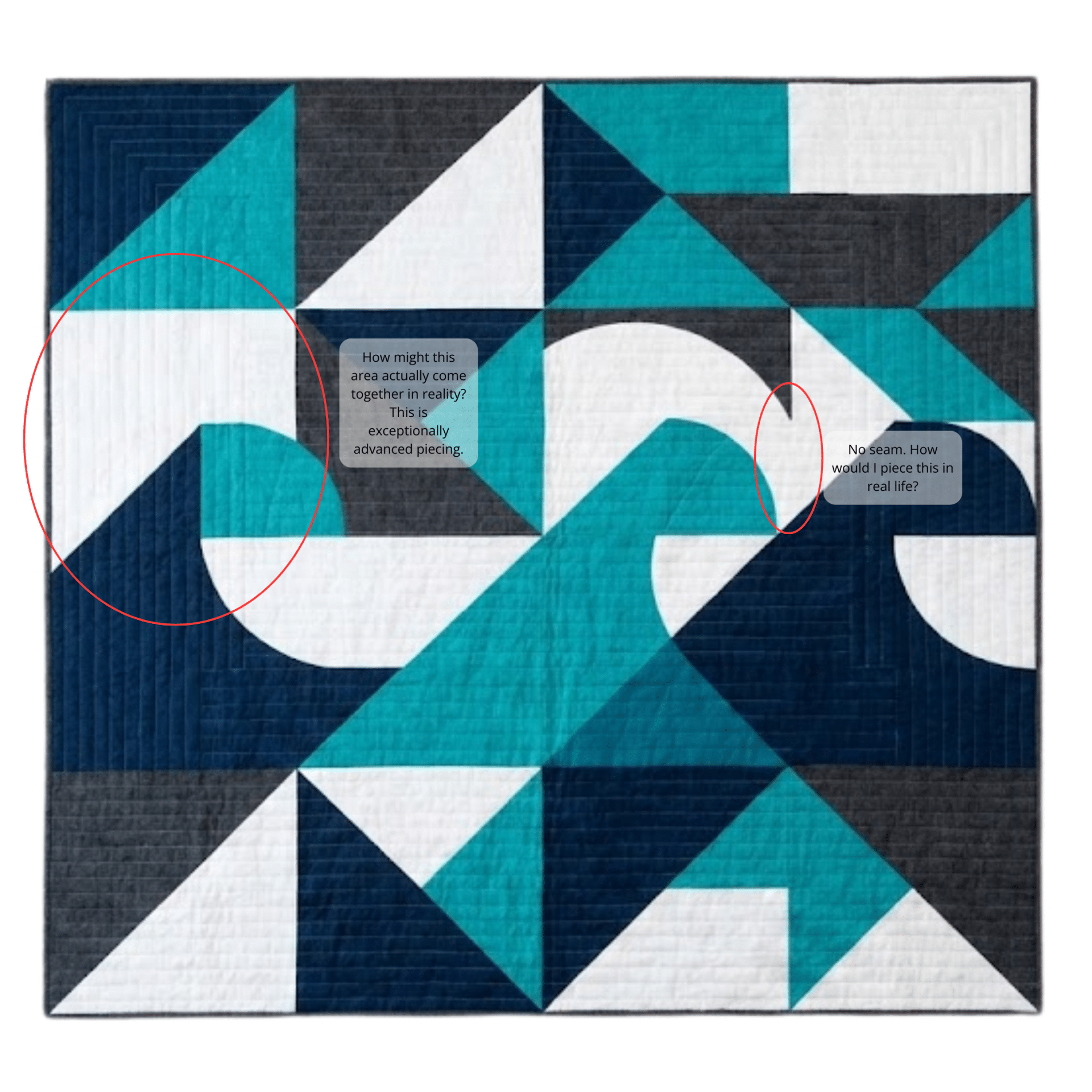
THIS is what I got after being more descriptive. I can DEFINITELY see the ocean wave inspiration in this!
But it still isn’t ready for developing into a quilt in the real world yet.
Step 2: The Reality Check (Don't Trust the Robot)
Once you have an image you love, you have to put on your “Quilter Goggles.”
Look closely at the image the AI generated. You’ll notice something: the AI cheats. It might show a block that is half-star, half-flower. It might show a border that disappears into nothingness.
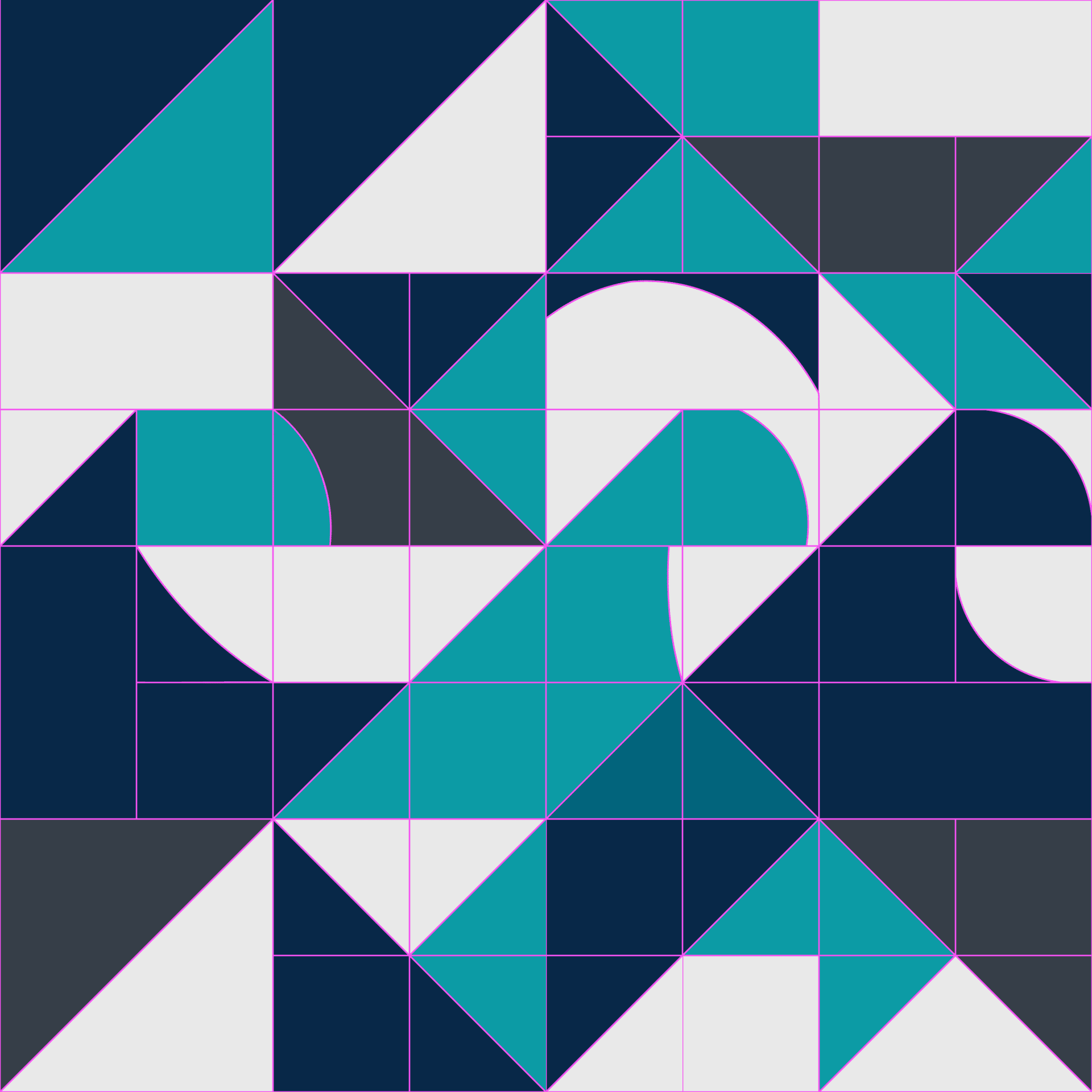
This is not a failure; it’s a feature. The AI is generating pixels. It doesn’t understand true patchwork. It’s giving you an impression of a quilt. Your job, as the human artist, is to take that inspiration and translate it into reality. You are the one who has to decide, “Okay, that shape is impossible, but I can swap it for a half-square triangle and get the same look.”
(Click on the images below to see my thoughts on the AI-generated image (left), and then how I modified the design to make it workable in fabric (right)).
If you’re on my mailing list, in this week’s email I share what the process looked like moving the design into fabric.
Step 3: Speaking the Language
The biggest mistake I see creatives make is using the wrong words. If you ask for a “pattern,” the AI might give you wallpaper. If you ask for “fabric,” it might give you a photo of a messy room.
To get custom quilt patterns with AI that are actually usable, you need to learn the specific “trigger words” that tell the AI to think like a designer. You need to know how to structure your prompt so the AI understands composition, style, and structure.
I call this the “Mad Libs Method.”
It’s a specific formula I use that forces the AI to stop hallucinating weird shapes and start generating clear, actionable design ideas. It turns a frustrating guessing game into a repeatable creative process.
Want the Formula?

I can’t fit an entire prompt engineering course into a blog post (we’d be here all day!). But if you are ready to stop fighting with the tech and start creating stunning, unique designs, I’m building online classes this year to walk you through the whole thing. I also wrote a book to overcome one of the biggest hurdles in the process: speaking to an AI platform the way it needs to be spoken to.
In Digital Muse: Bringing AI Into Your Creative Process, I break down:
- The exact “Mad Libs” formulas for perfect prompts.
- The “Variable Swap” technique for endless variations.
- Visual Keyword Lists: The exact words to use for lighting, texture, and style.
Stop guessing. Start creating.

Hey there, I’m Theresa, The AI Quilter. I’m here to help you connect technology and creativity in ways that feel human, creative, and completely your own.